> For the complete documentation index, see [llms.txt](https://docs.blockpi.io/llms.txt). Markdown versions of documentation pages are available by appending `.md` to page URLs; this page is available as [Markdown](https://docs.blockpi.io/welcome-to-blockpi/about-blockpi.md).
# About BlockPI
{% hint style="info" %}
BlockPI Network Alpha-net officially launched on October 25th, 2022. Compared to Testnet, it is a more stable version and ready for production environments. For more information, please refer to [BlockPI Medium article](https://medium.com/blockpi/blockpi-alpha-net-your-reliable-web3-rpc-service-provider-9574201ec90b).
{% endhint %}
BlockPI Network RPC service is supporting more than 70 blockchain networks. Check the full list .
{% content-ref url="/pages/yTzgeBfx6LS0iGegaFrN" %}
[Supported Networks and Advanced Features](/build/supported-networks-and-advanced-features.md)
{% endcontent-ref %}
## Service Structure
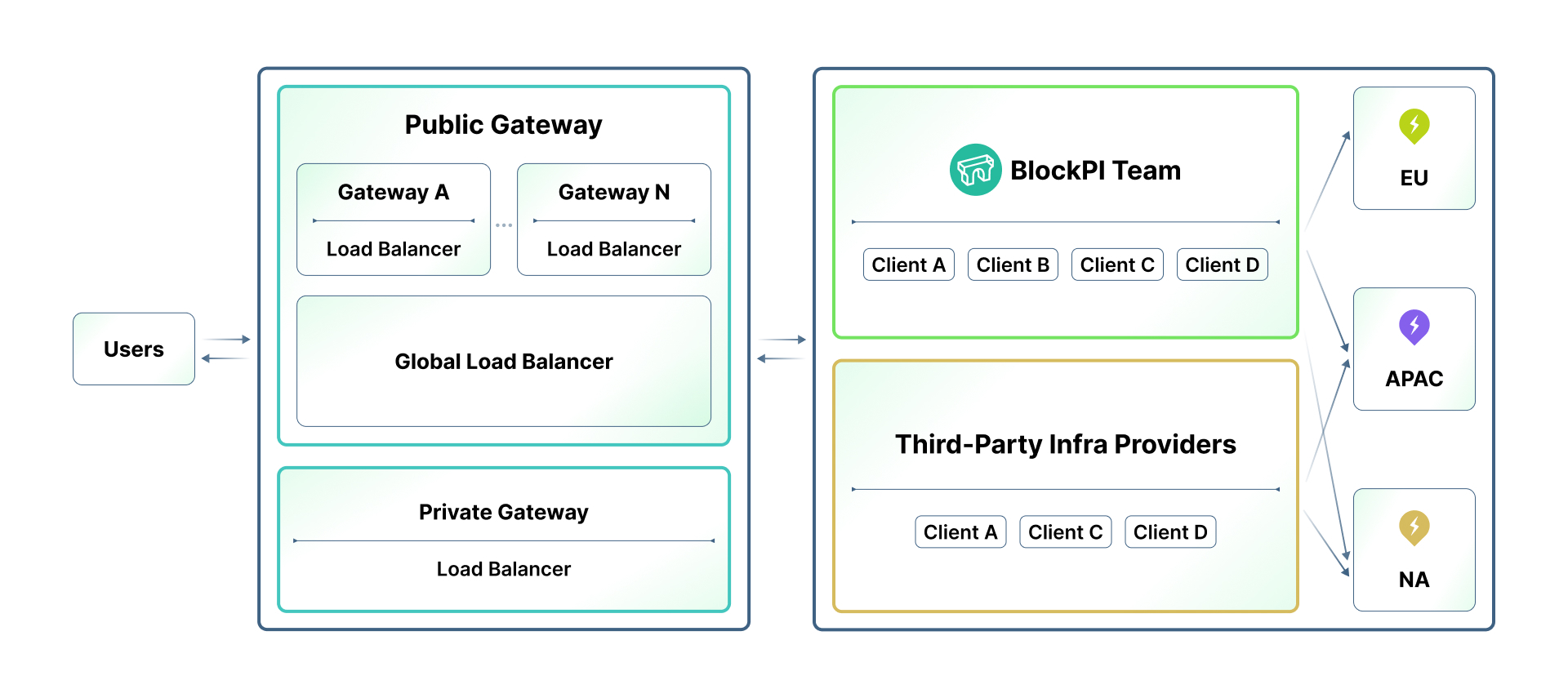
BlockPI Network aims to provide high-quality, robust, and efficient RPC service. To avoid the single-point failure and limitation of scalability, the network is designed to be a distributed structure with expandable working nodes. This page introduces the detailed roles and the service mechanisms of the BlockPI Network.
{% tabs %}
{% tab title="Users" %}
Users include individual developers, personal users, and blockchain applications. Regardless of the type of user, they send RPC requests through the RPC endpoint domain resolution provided by the RPC provider. Some applications place the RPC endpoint in the web frontend, so users send requests directly from their local machines to the RPC server. Other applications set up backend servers, where users first send requests to the backend of the applications, which then uniformly sends the requests to the RPC provider.
{% endtab %}
{% tab title="Gateway" %}
Gateways collect and sort users' requests, and route them to an appropriate Node Client by the BlockPI Load Balancer. The gateway is divided into general gateways and private gateways. General gateways serve all nodes across all chains, while private gateways are deployed flexibly for customized services.
{% endtab %}
{% tab title="Load Balancer" %}
The load balancer is an algorithm deployed within the Gateway. Our algorithm has undergone multiple iterations, configuring different settings based on the characteristics of each blockchain network to scientifically and reasonably allocate RPC requests to different regions and types of blockchain node clients.
{% endtab %}
{% tab title="Node Client" %}
Node Client is the end node that processes RPC requests and sends responses to users through Gateway. Some blockchain networks have multiple node clients, each with varying performance in handling RPC methods. After thorough testing, we create configurations for specific clients and provide them to the Load Balancer.
{% endtab %}
{% endtabs %}
## Service Lifecycle
* To use the BlockPI Network service, a user must register on [BlockPI Dashboard](https://dashboard.blockpi.io/) and create an API key. At the same time, the RPC endpoint (url) is generated. Different types of RU packages are also available to be purchased by users.
* Requests can be sent by this endpoint and routed to a proper Gateway by DNS.
* The Gateway checks the user authority. After that, it sends the request to a Node Client through BlockPI Load Balancer.
* Node Client processes the request and produce the response payload. The response is sent back to the Gateway and therefore delivered to the user.
### Guides for users: Jump right in
For a higher quality RPC service, follow these instructions to register and generate your first BlockPI API key.
{% content-ref url="/pages/ulZhxvt8pIs02hZ9fnU9" %}
[Registration & Login](/basic-tutorials/registration-and-login.md)
{% endcontent-ref %}
{% content-ref url="/pages/bK5Ss4ibcn8n9Mxj7uX3" %}
[API Key](/basic-tutorials/api-key.md)
{% endcontent-ref %}
{% content-ref url="/pages/kVTowHeGTXU6EYwGe7Wn" %}
[Wallet Set Up](/basic-tutorials/wallet-set-up.md)
{% endcontent-ref %}
{% content-ref url="/pages/pB1ZWAKiBztXyprIOtVN" %}
[Account Management](/basic-tutorials/account-management.md)
{% endcontent-ref %}
{% content-ref url="/pages/R5ArmMUwq3t3YhXi4tpf" %}
[Team Management](/basic-tutorials/team-management.md)
{% endcontent-ref %}
---
# Agent Instructions
This documentation is published with GitBook. GitBook is the documentation platform designed so that both humans and AI agents can read, navigate, and reason over technical content effectively. Learn more at gitbook.com.
## Querying This Documentation
If you need additional information that is not directly available in this page, you can query the documentation dynamically by asking a question.
Perform an HTTP GET request on the current page URL with the `ask` query parameter, and the optional `goal` query parameter:
```
GET https://docs.blockpi.io/welcome-to-blockpi/about-blockpi.md?ask=&goal=
```
`ask` is the immediate question: it should be specific, self-contained, and written in natural language.
`goal` is optional and describes the broader end goal you are ultimately trying to accomplish on behalf of the user. GitBook uses it to tailor the answer towards what is most useful for that goal.
The response will contain a direct answer to the question and relevant excerpts and sources from the documentation.
Use this mechanism when the answer is not explicitly present in the current page, you need clarification or additional context, or you want to retrieve related documentation sections.