> For the complete documentation index, see [llms.txt](https://docs.blockpi.io/llms.txt). Markdown versions of documentation pages are available by appending `.md` to page URLs; this page is available as [Markdown](https://docs.blockpi.io/basic-tutorials/api-key/customize-endpoint-advanced-features.md).
# Customize Endpoint Advanced Features
BlockPI provides users with ample flexibility to customize advanced features of their Endpoints, including Archive mode, MEV protection, and more.
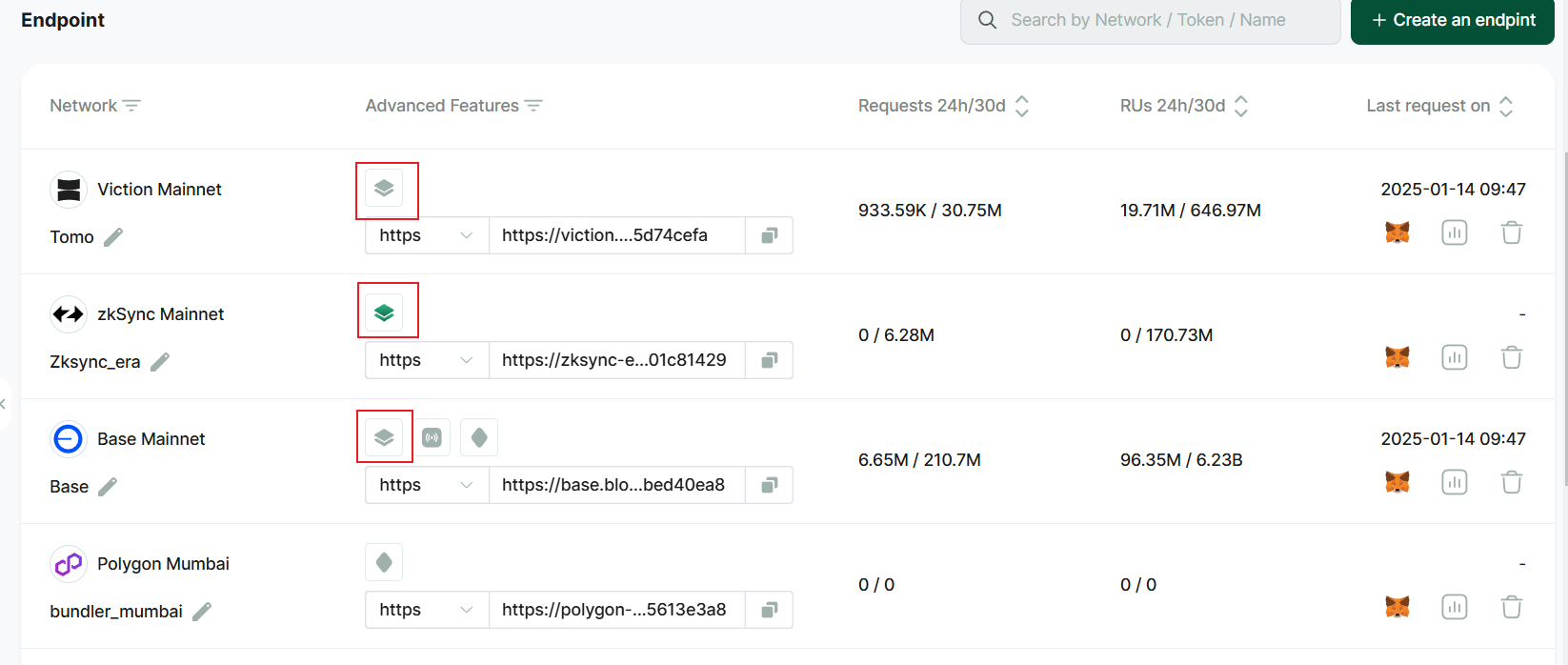
To determine whether a specific network supports any features, refer to the "Advanced Feature" column in the API Key List. For more detailed supported advanced features, please go to [this page](/build/supported-networks-and-advanced-features.md).
## Endpoint Whitelist
Each endpoint can have an independent whitelist, allowing you to set up to 10 IP addresses and domains. Once the whitelist feature is enabled, any requests sent to this endpoint will be checked; if they are not on the whitelist, an error will be returned.
## Archive Mode
If you require access to data from earlier blocks, you can utilize the **Archive Mode**. This feature enables users to retrieve and access the complete historical data of the blockchain.
Enabling Archive mode will route all requests sent to this API key to the archive nodes of the blockchain network. It's important to note that there is a **30% increase in RU consumption**, since running an archive node requires significant storage capacity.
In order to optimize efficiency, we recommend activating Archive mode only when necessary, or generate an individual API key to send the archive requests. Check [Best Practices](/basic-tutorials/best-practices.md) to more efficiently use the feature. Additionally, processing times may be longer due to the substantial amount of data involved. Check [here ](/build/supported-networks-and-advanced-features.md)for the full list of chains that the Archive mode is supported.
By default, the Archive mode is set to off. To enable it, simply click on the Archive mode symbol corresponding to the endpoint in the API Key list.
## MEV Protection & Global Cast
To provide users with a better experience in using BlockPI RPC, we have implemented MEV protection function on **BSC Mainnet, Ethereum Mainnet, Base Mainnet, and Polygon Mainnet**. Enabling MEV protection safeguards your transactions against **front-running** and **sandwich attacks**. And this feature does not increase RU consumption. We highly recommend enabling it. We employ the MEV-Boost protocol, which is currently the industry's most mature and stable MEV protection protocols. Additionally, we have implemented our own load balancing mechanism. If there is any congestion on the MEV network, we will immediately route user transaction requests to the public mempool. \
\
In contrast, Global Cast can send users' transactions to BlockPI's global network instead of just sending them to a specific node in the node pool, allowing their transactions to quickly fill the public mempool across the entire blockchain network. With this feature enabled, there are two improvements:
1. **Elimination of Performance Fluctuations**: It removes the performance and network fluctuations of individual RPC nodes, ensuring that users experience the fastest transaction sending from the node pool.
2. **Increased Transaction Success Rate**: It guarantees the success rate of user transactions, ensuring that transactions are effectively and quickly added to the mempool and reach the blockbuilder, especially during times of network congestion like airdrop claim events.
{% hint style="info" %}
This feature is mutually exclusive with the MEV functionality because MEV uses private mempool.
{% endhint %}
To use these functions, go to the Endpoint List of the user's dashboard, click the broadcast icon.
You are able to switch it to Normal, MEV Protection or Global Cast. Only one of the three can be selected.
---
# Agent Instructions
This documentation is published with GitBook. GitBook is the documentation platform designed so that both humans and AI agents can read, navigate, and reason over technical content effectively. Learn more at gitbook.com.
## Querying This Documentation
If you need additional information that is not directly available in this page, you can query the documentation dynamically by asking a question.
Perform an HTTP GET request on the current page URL with the `ask` query parameter, and the optional `goal` query parameter:
```
GET https://docs.blockpi.io/basic-tutorials/api-key/customize-endpoint-advanced-features.md?ask=&goal=
```
`ask` is the immediate question: it should be specific, self-contained, and written in natural language.
`goal` is optional and describes the broader end goal you are ultimately trying to accomplish on behalf of the user. GitBook uses it to tailor the answer towards what is most useful for that goal.
The response will contain a direct answer to the question and relevant excerpts and sources from the documentation.
Use this mechanism when the answer is not explicitly present in the current page, you need clarification or additional context, or you want to retrieve related documentation sections.